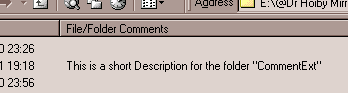
| |
| Title: please give exact registry. |
[2008-06-06] |
|
I istalled you wonderful tool but am unable to add column.
may be i am not putting correct registry entry.
please help. thanks in advance.
Devesh raj
India.
dshrj@yahoo.com |
You don't have this line in you column editor ?
 | [2009-02-04] | |
| |
| Title: How do I get data in there |
[2008-08-05] |
|
| OK I have a column - now how do I enter comments for say a Folder, or a .reg file |
| You have to install "HobComment Explorer Extension" to edit them. | [2009-02-04] | |
| |
| Title: i am habib |
[2008-08-13] |
|
| is it very working thing and also very fine? |
| Yes, it's fine, and great :) | [2009-02-04] | |
| |
| Title: Column comments does not work |
[2008-10-21] |
|
| Comments show only in tooltip not in column. Does not work on files nor folders. (XP SP3) |
| Waiting Answer |
| |
| Title: Xp Sp3 The comment does appear in the appropriate column in WinExplorer |
[2009-01-28] |
|
| It works properly only for files, but not for folders. |
| Waiting Answer |
| |
| Title: On Windows 2000 |
[2009-02-16] |
|
| Can see "Comment" field working on some folders and files (even shortcuts I've added)but haven't found a way to add or edit any others. Any thoughts? Thanks DWeir1@comcast.net |
| Waiting Answer |
| |
| Title: comments to folders |
[2009-04-06] |
|
this is great, thank you so much for your work.
I noticed this does not work for folders, only for files...
any way around it? |
| Waiting Answer |
| |
| Title: Think twice before changing the column name! |
[2009-04-19] |
|
I just installed both dlls (commentExt + hobcomment) - and it works nicely on XP SP3. Thank you very much.
One thing though: Changing the column name (like outlined above) with the ColumnTitle key does not work for directories - they always default to File/Folder Comments.
Since it works differently for Folders, I am not surprised -
but, if you cannot make the 2 uniform, it's not helpful to rename the column. |
| Waiting Answer |
| |
| Title: Windows vista |
[2009-07-17] |
|
I am really keen to find a utility that will make it easy for me to add notes/comments to files and folders in Vista. Will your Hobcomment software work with Vista, please?
Kind regards
Ray |
| Waiting Answer |
| |
| Title: XP x64 version? |
[2009-10-30] |
|
Great idea Dr Hoiby!
I'll second the request for a 64 bit version. |
| Waiting Answer |
| |
| Title: Windows 7 64bit |
[2010-02-05] |
|
I can add a "comments" column in the folder view of the file list but cannot find how to add a comment into this column for a file. In XP Pro this was standart.
Could your tool help me do this in win7? |
| Waiting Answer |
| |
| Title: 2 Columns |
[2010-06-03] |
|
| Is there a way to add 2 columns instead of 1? |
| Waiting Answer |
| |
| Title: Help.. comment box won't disappear |
[2010-08-08] |
|
| Hello.. I've loaded both files for my XP system 2002 version running SP3. I click ...Add Comment against a file and a box appears in the middle of the screen and I type in a comment. The whole screen freezes except for the comment box which I can't clear by clicking anywhere else. The only way I can get rid of the box is to delete the comment and hit the Esc key. |
| Waiting Answer |
| |
| Title: where do I find the "Desktop.ini" file ? |
[2011-09-17] |
|
where do I find the "Desktop.ini" file ?
I am using FAT32 for one of my drive. |
| Waiting Answer |
| |
| Title: drive comments |
[2012-05-22] |
|
| how do i put comments on drives! so that they show up in "My Computer" listings.... |
| Waiting Answer |
| |
| Title: 64 Bit Hob Comment |
[2012-06-16] |
|
Hey people did you try running HOB Comment in Compatibility mode for x64 Window's Versions?
Les - |
| Waiting Answer |
| |
| Title: Comments for Drives in MyComputer (DetailsView) |
[2012-12-16] |
|
On the root of the drive (eg C: Drive) create a file 'desktop.ini' with content:
--- snip ---
[.ShellClassInfo]
InfoTip=THIS IS MY DRIVE COMMENT
--- snap ---
and give it Attributes HS
eg. on CommandLine: attrib +H +S C:\destop.ini
or attrib +H +S \desktop.ini (when anywhere on C:) |
| Waiting Answer |
| |
| Title: not seeing ...Add File/Folder Comments with right click |
[2013-01-03] |
|
| The ...Add File/Folder Comments option does not show when right clicking on a file or folder...It used to work but not it doesn't.... I'm using XP sp2 and an antivirus program |
| Waiting Answer |
| |
| Title: Not showing in column, only on hover: SOLVED |
[2013-05-03] |
|
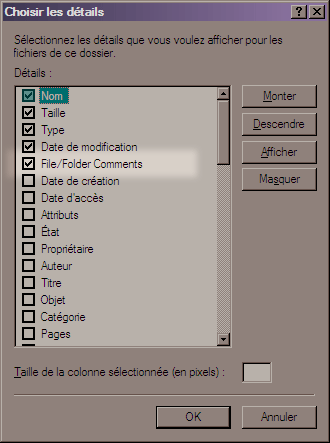
| This is not listed clearly in any instruction but is vital. I was only seeing comments on hover. The problem is I added the "Comments" option to my explorer window instead of the "Files/Folders Comments". Right click the grey bar where you see listing for Folder name and select ...more at the bottom of the drop down menu. When the window opens up carefully scroll down until you see "Files/Folders Comments" and select that. BOOM! Thank you Dr Holby. You are a diamond. John progresslanguage@gmail.com |
| Waiting Answer |
| |
| Title: Can't see comment column |
[2014-02-28] |
|
| OK I Found the reg key (I didn't realize you had abbreviated it and decided to change the title to Hobs Comment because for some reason I couldn't fine File/Folder comment when I right clicked on the column bar selected more and slowly scrolled through the list it was not there but still it's not there, I did a restart encase that was needed but still not in the list I even checked right to the end even though it is in alphabetical order. So it's in my reg as hobs comments but not showing in the column selection even when I click "more", why?. ps using Windows 7 |
| Waiting Answer |
| |
| Title: Not working on WIndows 7 |
[2014-06-18] |
|
| Hi guys. This doesn't work on Windows 7. Windows still lacking in useful features. Is there an update or is this site stale now? |
| Waiting Answer |
| |
| Title: Yes! It does work on Windows 7 Ultimate, 32bit (X86) |
[2015-08-28] |
|
| Comments can be viewed by adding "Comments" column to folder 'Details" view. On both DLL files you have to right click and 'Run as Administrator' and reboot or kill explorer.exe in task manager and run it again. The only thing I can;t yet figure out is the registry location of the CLSID to change the column name, 'Comments'. It's not the same as in XP. At least it works in Windows 7. |
| Waiting Answer |
| |
| Title: Install Successfully , Very Useful software |
[2017-04-16] |
|
I couldn't find the column "File/Folder Comments" at the beginning and failed to install the "HobComment XP Shell Extension v1.8 beta". The system showed the information kind of "load library xxx failed".
Then I used the software "dependency walker" to check DLLs that I need to install properly first.
And that successful information showed up.It is very convenience for me as a non-native English user. Many softwares I use are only forced to create or insert file/folders in a English name and path.
Now I can add my own comments into files/folders to markdown useful information.
Thank you so much!
asnoop@gmail.com |
| Waiting Answer |
| |
| Title: Serious problem |
[2020-12-31] |
|
Hello, the program works only onto NTFS discs, and absolutely no onto FAT32. Proven!
Any work-around 'bout this ? |
| Waiting Answer |