Dr. Hoiby TitlePygmy Productions Logo - Conception et Réalisation de Jeux-Video - Paris

HOME

FREEWARES
HobRes32 2.7
CatchColor 1.0.8
OpenGL Infos 1.13
Explorer Patch (256 colors TrayIcons)
HobComment Explorer Extension
HobComment XP Shell Extension
Mouse Jail
Who Lock Me ?
LockWindows
ATI Wonder Remote - BSPlayer Plug'In
GoTo Shared v1.0
SVNSync v1.3
SVNSync Explorer Extension v1.0.2 (UPDATED)
Hob New Project Wizard v1.0
WinCRC v1.0
FolderContextMenuEx v1.0

BOARD GAMES
Kings and Things

RESOURCES
Small Font 6x10 for LCD Monitor

ARTIFICIAL INTELLIGENCE
Spirops IA Toolkit
Spirops Crowd Toolkit

WORK WITH ME ?

WORK WITH MY FRIENDS ?

CONTACT ME

   Tools
 

Application
HobRes32: (Choose your Multi-monitors resolutions)


Application
CatchColor: Display Hexa-value of A Pixel from your Mouse position


Application
OpenGLInfos: Display OpenGL Infos and Test a tiny scene


Windows Patch
You can now use 256 colors icon in your TrayBar


Application
HobComment: Add/Edit comment for each of your directories


Application
HobComment XP: Add a column displaying the file/folder comments in Explorer


Application
MouseJail: Capture the mouse in the game


Application
WhoLockMe: List process locking in file


Application
LockWindows: Lock your Windows in one click


Plug'In
ATI Wonder Remote - BSPlayer Plugin: Controls BSPLayer with your ATI Wonder Remote.


Application
GoTo Shared: Display your Shared Folders and Open it when you Double Click on it.


Application
SVN Sync: Extract


Application
SVNSync Front-End for Explorer.


Visual Studio 6.0 Addin
Replacement for Visual Studio 6 'New Project...' Wizard.


Application
Computes a Crc32 from a string and push the result into the ClipBoard.


Application
Explorer Extension : Displays Folder Context Menu Items into Background Context Menu.


SVNSync Front-End for Explorer.

SVNSync Explorer Extension v1.0.2

To download this freeware
SVNSyncExplorerExt1.0.2.zip
(30KB)

Dr. Hoiby is the author of this little tool.
All Dr. Hoiby's Freewares are certified without Java, without .NET and without any Virtual Machine Code.
He can be reached at
webmaster@dr-hoiby.com.

What is SVNSync Explorer Extension ?
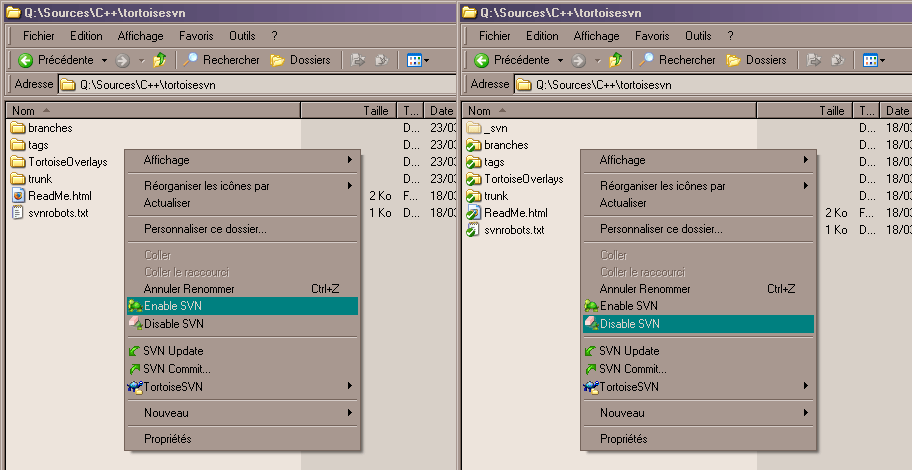
SVNSync Explorer Extension is a SVNSync front-end for Explorer.
Install:
  • Be sure that SVNSync.exe is installed in a directory contained into the PATH environment.
  • Copy SVNSyncExplorerExt.dll into a directory (for example : "c:\program files\SVNSync\" )
  • Launch the command :
    regsvr32 "c:\program files\SVNSync\SVNSyncExplorerExt.dll"
  • Uninstall:
  • Launch the command :
    regsvr32 /u "c:\program files\SVNSync\SVNSyncExplorerExt.dll"
  •  

    History

  • v1.0.2 : 2008, June 29 :
  • Bug Fixed.
  • v1.0.1 : 2008, April 5 :
  • Bug Fixed.
     
    This freeware is a beta version.
    Dr Hoiby. -- June 29, 2008 --
    Ask a question :
    Title:
    SPAM Protection: Write "2008" Here Validation Code: 
    F.A.Q