| |
| Title: How do you uninstall |
[2008-03-29] |
|
| How do you uninstall Hob Comment? |
| I updated this page with the answer. (Install and Uninstall instructions) | [2008-03-29] | |
| |
| Title: Vista version? |
[2008-04-01] |
|
| Hello, Is it possible that there comes a vista-vers |
one day, i'll be forced to install Vista on my computer :(
On this sad day, I'll make a vista version.
Sorry about that. | [2008-04-22] | |
| |
| Title: Searching Files |
[2008-04-04] |
|
| is possible to search for a file by its comment? |
not for now.
sorry | [2008-04-05] | |
| |
| Title: directory comments not showing up |
[2008-04-28] |
|
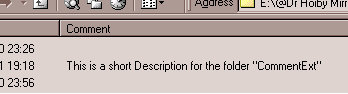
| Directory comments show up when I put the mouse over the folder but they dont show up under the comments colume. Do I need to make a registry modification? |
| If you are using Windows XP, you need to install "HobComment XP Shell Extension" | [2009-02-04] | |
| |
| Title: add comments to multiple files? (will be used as a substitute for tagging? |
[2008-04-30] |
|
| will there be support for multiple file add comment? |
| Not yet, but you can achieve this goal by using the command line version of "HobComment" | [2009-02-04] | |
| |
| Title: Commenting folders |
[2008-05-01] |
|
| U can add a comment to a file but not to a folder. Something wrong here, or can there be an additional utility to do this? |
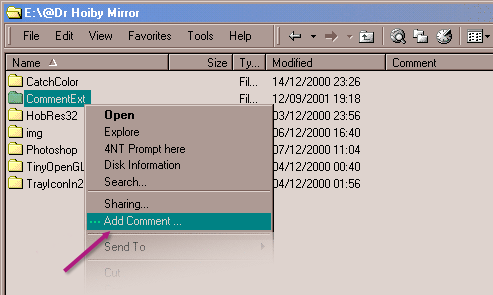
You can add comment to directories as you can for files.
But to see it, if you are using XP, you need to install "HobComment XP Shell Extension".
(Not needed for Windows 2000). | [2009-02-04] | |
| |
| Title: Over Network ? |
[2008-06-17] |
|
Great tool, can it be used over a network though ?
Multiple users accessing a network drive all see the comments ? |
Yes you can.
The comments are stored in the file "desktop.ini" located into the folders.
So the comments are accessible to anyone | [2009-02-04] | |
| |
| Title: not closing. in win xp |
[2008-08-12] |
|
| Once I right click and add a comment I am unable to close the comment despite clicking on other areas.....only whenn i re select the commetnt text box and hit "control + f4" am i able to close the comment box and th comment is also not being added. |
Oops !
Can you tell me more about your system (Windows version, language, tools installed ...) ?
| [2009-02-04] | |
| |
| Title: Is there a shortcut key |
[2008-09-17] |
|
I love this feature but I was wondering is is possible to assign a shortcut key to this feature to bring up the add comment box?
(My right click menu is kinda of long) |
Great Idea.
I'll try to add this feature soon. | [2009-02-04] | |
| |
| Title: Comments not working on network drive |
[2008-10-23] |
|
| I have installed both HobComment107 and HobComment XP Shell Extension. It works great on files on my PC. However, it will not save the comments when the file is located on a network drive. I have tried on various PC's. Please help!! |
It's strange.
What's appening ?
- The edit box is displayed ?
- A "desktop.ini" is created into the folder ?
- The column "File/Folder Comments" is visible into your explorer ? | [2009-02-04] | |
| |
| Title: Thank you!! |
[2009-02-19] |
|
| Man, i love you so much! I have been looking for this kind of app. for weeks. Continue your great works! |
| Waiting Answer |
| |
| Title: THANKS SO MUCH & 1 more question |
[2009-02-21] |
|
hello,
i've been searching for a tool like this sooooo very long, thanks a lot - this makes organizing my files so much more comfortable than before!!! still i've got one more question: is it also somehow possible to create TWO (or maybe more) comment columns for folders??? for my specials needs this would be very, very helpful & it would be like christmas if there was some way to achieve this!
greetinx, barracuda |
| Waiting Answer |
| |
| Title: Is there a vista 64 bit yet? |
[2009-04-07] |
|
I know the creator was working on this ... please let me know when it's complete. I really need my comments : )
Please contact me by E-Mail: alexus30f@yahoo.com |
| Waiting Answer |
| |
| Title: What are the command line parameters? |
[2009-04-15] |
|
| I want to change the comment of multiple folders in one go. What are the command line parameters if I want to script this? |
| Waiting Answer |
| |
| Title: Doesn't work with W98SE ? |
[2009-05-28] |
|
Platform:
W98 Second Edition, fully MS Patched.
Try as I may, I cannot get a "Comment Column" to appear within W98se.
I get The long, white Rectangular "comment Box" (to make the comment, is what I suppose that is).
I can add a comment (viz. Test.
I must hit the "Enter" key to make the box close.
But I never see a comment, nor a comment column. :-|
FYI: I have long been been able to add the (once present, lon ago) "Attributes" column within W98se, so creating a mormally non-existent column to be created within W98se is not entirely impossible. Just this one -- Hob Comment. :-(
Incidentally, The Batch File doesn't work (for me) either. I had to run Regsvr32.exe to register and unregister the DLL file. I also had to manually remove/delete the Folder containing the DLL and the Batch file.
Any pointers as to what/why this doesn't work in W98SE environment? I sure wish it did.
Thanks all the same.
Capt.Picky |
| Waiting Answer |
| |
| Title: Sorry about my Typographical Errors in my prior post |
[2009-05-28] |
|
My apologies for my FAQ question "Doesn't work with W98SE ?" which contained numerous typo's.
Corrections are as follows:
...comment (viz. Test)...
...add the (once present, long ago)...
...creating a normally non-existent... |
| Waiting Answer |
| |
| Title: Can it work on Vista? |
[2009-10-28] |
|
| I hate IE... |
| Waiting Answer |
| |
| Title: Windows 7 64 bit |
[2009-12-04] |
|
| Your program worked like a charam in Windows XP, but unfortunately not anymore in 64 bit Windows 7. To my big surprise I still see those old comments however in Locate32 under Comments. So there should be a way to also make the Comments visible in Explorer. Many, many people are anxiously waiting for the possibility to add Comments again and to make them visible again in Explorer. Are you still "alive"? Thanks in advance for your reply. |
| Waiting Answer |
| |
| Title: Thank you |
[2010-01-31] |
|
| Thank you for this wonderful program which, as it seems from these comments, has benefited many people. Myself included! |
| Waiting Answer |
| |
| Title: Info Location |
[2010-01-31] |
|
| Is there a location where the stored information can be accessed as an entirety, instead of on a comment-by-comment basis? Thanks for any answer. |
| Waiting Answer |
| |
| Title: wedding |
[2010-02-04] |
|
| How do you uninstall Hob Comment? |
| Waiting Answer |
| |
| Title: Desktop.ini file won't hide |
[2010-02-08] |
|
| Hello, after I add a comment to a folder I go into the folder and the desktop.ini file is there but I can't hide it? Any suggestions? Many thanks!!! LOVE the program. |
| Waiting Answer |
| |
| Title: W/7 64 bit applicable? |
[2010-03-10] |
|
Will this program work with Windows 7 on a 64 bit machine?
Thank you |
| Waiting Answer |
| |
| Title: CmdLine argument for HobCommentCmdLine.exe |
[2010-09-21] |
|
Tools work fine on XP. Thx for your great idea.
But ist there an argument/switch for HobCommentCmdLine.exe ( beside ..>HobCommentCmdLine.exe [Path\]Folder-/Filename.ext "Comment" ) to also view FileComment-Stream and/or [.Descript_ions]-Section in the Console too ?? |
| Waiting Answer |
| |
| Title: from what I know it will never work on Vista, 7 & later.. |
[2012-02-05] |
|
..as Microsoft removed API that allows any column additions.. :(
see FolderSize for explanation.
one of the reason I'm not going to switch to Vista or 7 for as long as possible.
love your shell extensions. thanks!
btw does it save the comment itself in other data stream? |
| Waiting Answer |
| |
| Title: Hob Comment for x64 systems??? |
[2012-02-26] |
|
I have comments set on every program I install and every
shortcut. Would you tell me how to use it in x64, or
consider updating this terrific little util for x64. So few folks know to use comments so they can tell what specific .exe, .bat, .lnk etcitera really do,,,,but those
few of us really do appreciate having this tool |
| Waiting Answer |
| |
| Title: Windows 7 64 bit version? |
[2013-01-18] |
|
| I would REALLY appreciate a version of this that works on Win 7 64. For now I'm editing and saving desktop.ini files. |
| Waiting Answer |
| |
| Title: Win XP Chinese Version |
[2013-12-20] |
|
A fantastic extension!
However, seams not work in my WindowsXP Chinese Version. :-( |
| Waiting Answer |
| |
| Title: Windows 10 X64 compatible? |
[2016-02-15] |
|
| Question in title |
| Waiting Answer |
| |
| Title: Comment is chnaged, but not shown in Comments collumn |
[2016-05-20] |
|
| I'm running windows 7 and installed you tool. Now I can edit the comment and pressing again the "addCommand" is showing also the correct, edited comment. Unfortunately in the Windows explorer comments Column, i'm not seeing the comment??? |
| Waiting Answer |
| |
| Title: New software XRumer 16.0 + XEvil solve ANY Captcha |
[2017-06-13] |
|
Revolutional update of SEO/SMM package "XRumer 16.0 + XEvil":
captchas solution of Google, Facebook, Bing, Hotmail, SolveMedia, Yandex,
and more than 8400 another size-types of captchas,
with highest precision (80..100%) and highest speed (100 img per second).
You can connect XEvil 3.0 to all most popular SEO/SMM software: XRumer, GSA SER, ZennoPoster, Srapebox, Senuke, and more than 100 of other programms.
Interested? You can find a lot of introducing videos about XEvil in YouTube.
Good luck ;) |
| Waiting Answer |
| |
| Title: Win10 doesn't work |
[2021-02-02] |
|
Hi, unfortunatly that doesn't work on Win10...
Any solution ?
Thanks ! |
| Waiting Answer |